

 English
 Español
 Português
 Українська
 Ελληνικά
 Русский
DOWNLOADS
Download Game Client [11.8GB]:
Download the classic Interlude game client to your computer. Always run updater first to launch the game.
When download is complete, extract game with an archiver program (WinRAR) to any directory.
System Requirements:
Minimum:
Operating System: Windows 7
CPU: Intel Pentium 4 - 3.0 GHz
RAM: 1024 MB
Disk Space: ~10 GB
Graphics Card: NVIDIA GeForce 6600 GT or ATI Radeon X1600
Connection: 1 Mbps
Recommended:
Operating System: Windows 10
CPU: Intel Core i5-7400 - 3.6 GHz
RAM: 4096 MB
Disk Space: ~10 GB
Graphics Card: NVIDIA GeForce GTX 970 or ATI Radeon R9 290
Connection: 24 Mbps
Download UpdaterMID [4.1MB]:
Download the latest L2Network Mid server updater from any link above. Always run UpdaterMID.exe to launch the game.
Run it in any folder and game files will be checked and downloaded, if needed.
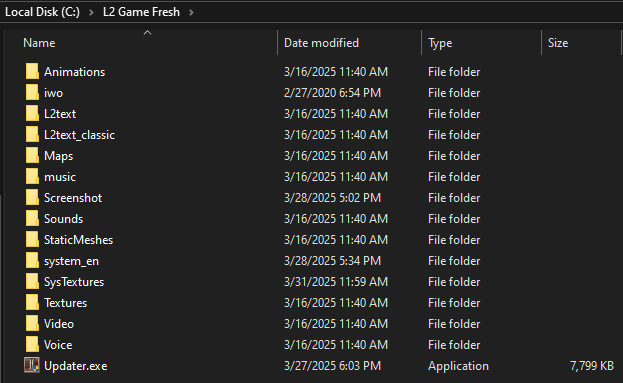
Example game folder structure:
Download UpdaterPVP [4.1MB]:
Download the latest L2Network PVP server updater from any link above. Always run UpdaterPVP.exe to launch the game.
Run it in any folder and game files will be checked and downloaded, if needed.
Example game folder structure: